Language: English
This guide is written for IT administrators who want to automate the process of removing users from ActivityInfo.org when they are no longer active in their organization.
Introduction: What is automatic de-provisioning?
Many organizations, especially those that work with multiple teams and people, prefer to keep one central record of who works for them and what they’re allowed to access. Identity providers (IdP) make it possible to centrally manage users.
ActivityInfo supports Single Sign On (SSO) through external identity providers like Microsoft Entra, Google Workspace, and Okta. This ensures that users don’t have to remember an extra password, and their organization’s sign in rules -- such as two-factor authentication and conditional access -- protect their ActivityInfo accounts. When a staff member leaves the organization, they also lose access to ActivityInfo because they are no longer able to log in.
With only SSO, however, a user who has left the organization remains authorized to access ActivityInfo databases, even if they aren’t able to log in. The user continues to require a license, makes it difficult to keep an overview of who is really active in the database, and requires regular, manual review to remove inactive users.
The System for Cross-domain Identity Management (SCIM 2.0) is an open standard protocol that helps close this gap. It establishes a direct connection between an organization’s identity provider and ActivityInfo. When combined with SSO, it means that users will not only lose access to ActivityInfo when they leave their organization, but their access and license will automatically be revoked as well.
What happens when a user is de-provisioned
Once you have configured SCIM synchronization, your organization's directory will inform ActivityInfo.org whenever a user is disabled in your directory.
ActivityInfo will automatically review the list of disabled users each day. Any user that has been disabled for more than 72 hours will be de-provisioned.
When a user is de-provisioned, their role in all databases they have access to will be revoked, just as if the database's administrator had revoked their access.
The revocation will be recorded in the audit log, and the database's security contacts will be notified by email.
If the de-provisioned user has been invited to databases owned by other organizations on the ActivityInfo.org platform, their role in those databases will also be revoked. For example, if you are an NGO working in humanitarian relief, your staff members are likely to have been invited to a UN database. Your staff members use the same ActivityInfo.org account to access both, and their role will be revoked from those databases as well.
Step-by-Step Configuration
Step 1: Link your email domains to your ActivityInfo.org billing account
Before you can synchronize between your identity provider and ActivityInfo, you need to connect your email domains to ActivityInfo.org. This gives you permission to activate and deactivate users within those email domains.
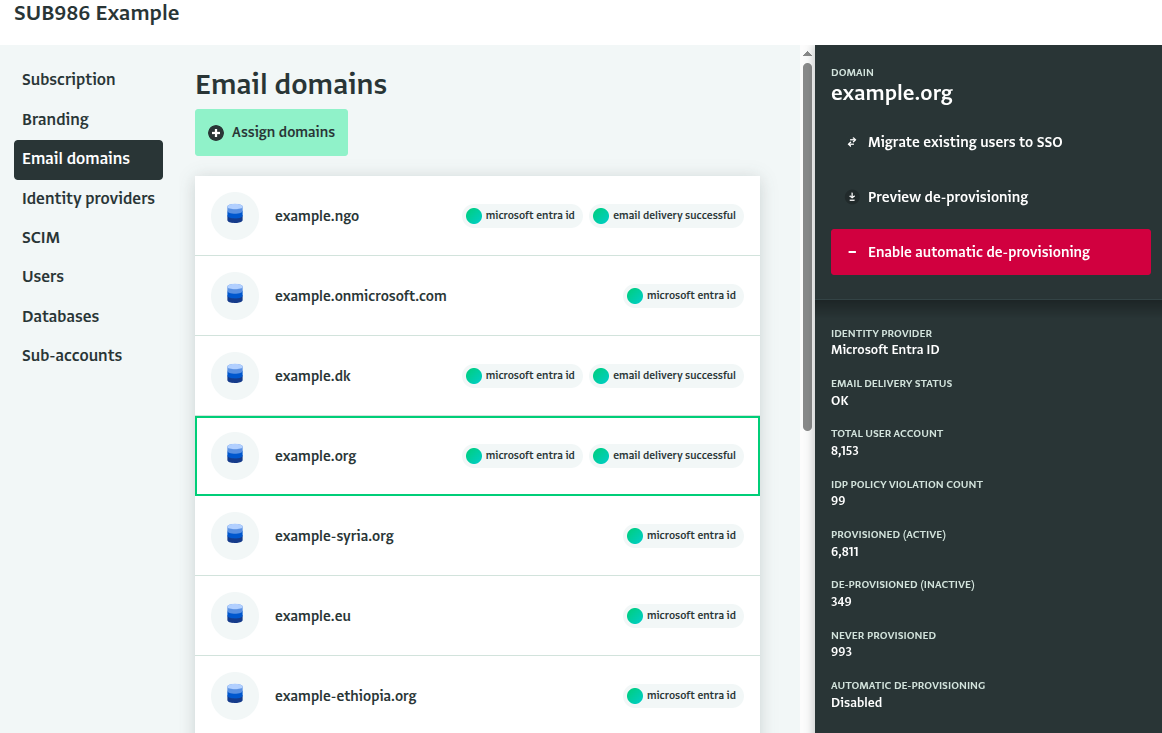
Navigate to your Billing Account from your profile menu. Then navigate to the "Email domains" section. Ensure that ALL of your organization's domains are listed here. If there are any missing domains, raise a support ticket with the list of domains with our team. We will verify that you own the domains and link them to your account.
Step 2: Enable SCIM 2.0 synchronization
Next, generate a SCIM token and follow the instructions for your identity provider to enable synchronization:
You must synchronize all users in your organization's directory with ActivityInfo. If you limit synchronization to a smaller group, then users outside of that group will appear to ActivityInfo as inactive, and will be automatically de-provisioned.
Step 3: Verify synchronization
Once you have enabled SCIM 2.0 synchronization, it may take a day or more to fully synchronize with your directory, depending on the size of your organization.
Select a domain to see the status of the synchronization. The side panel shows:
- Total user accounts: the total number of users with this email domain with an account on ActivityInfo.org. This includes users that were invited, those who signed up for free trials, and any users synchronized from your directory to ActivityInfo via SCIM.
- Provisioned (Active): the number of these users that are active in your organization's directory, according to SCIM.
- De-provisioned (Inactive): The number of users that are inactive in your organization's directory, according to SCIM.
- Never provisioned: The number of users with an account in ActivityInfo that have never been synchronized from your directory, either active or inactive. This is primarily users who had an account on ActivityInfo.org before SCIM synchronization was enabled.
- Automatic de-provisioning: Whether users who are reported as inactive in your organization's directory, according to SCIM, will be automatically de-provisioned from ActivityInfo.
You can also click the "Preview de-provisioning" button to generate a report that shows which users would be de-provisioned:
| Billing account | Database | Database ID | Name | Provisioning status | |
|---|---|---|---|---|---|
| My organization | Global M&E | c32434234 | Bob | bob@example.org | INACTIVE |
| My organization | Global M&E | c32434234 | Alice | alice@example.org | NONE |
| My organization | Togo-Pineapple Project | c2ad3kmgfg | Alice | alice@example.org | NONE |
| UNOCHA | HPC.tools Country Module: Niger 2026 | cbjjj4333 | Bob | bob@example.org | NONE |
In the export above, both Bob and Alice will have their access revoked from your organization's Global M&E database, and Alice's role will be revoked from the country-level database in Togo.
Bob has been explicitly reported as "Inactive" by your directory - meaning he has left the organization at some point after you enabled SCIM synchronization.
However, ActivityInfo has never received any information from your directory about Alice. That could mean that she left the organization before SCIM integration was enabled, or it could mean that she has somehow been left out of the synchronization due to a misconfiguration in your identity provider. Double check these entries before proceeding.
There is also an entry for Bob's access to a UNOCHA reporting database in Niger. Once you enable automatic de-provisioning, Bob's role will also be revoked from this database, even though it is not owned by your organization. This improves account security for your organization and your partners.
Step 4: Enable automatic de-provisioning
Once you have verified that the synchronization is correct, click Enable automatic de-provisioning and then confirm.
This will start a batch job to revoke access for all users reported as inactive, or for whom we have not received an update from your directory ("NONE" in the export above). Once this is complete, automatic de-provisioning will be enabled and users reported as disabled by your directory will have their access revoked continuously.
You must repeat this process for each email domain linked to your Billing Account.