Announcing Email Notifications - Getting the Right Information to the Right People, Automatically
With ActivityInfo 5.0 we have been introducing a series of new functionalities that aim to help you leverage the platform’s capabilities not only as a trusted repository of records but also as a tool for organizational operations. From the interactive table view to the record detail view, we want to help users improve program and service quality by enabling consistent and efficient operations.
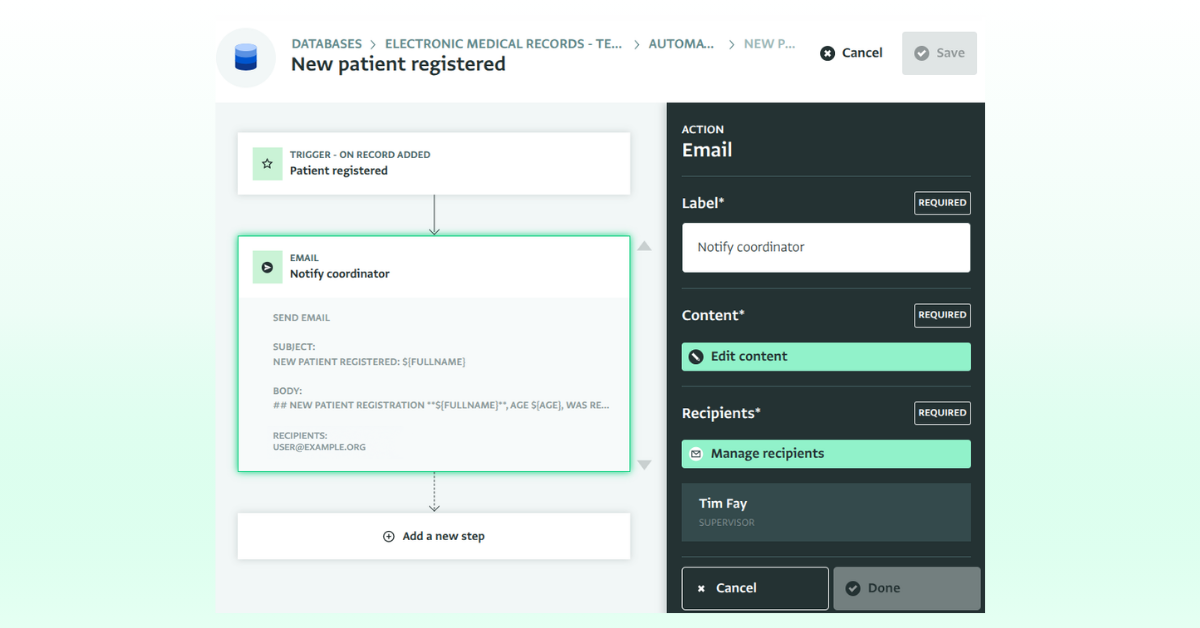
It is now possible to send out email notifications to users in your databases in ActivityInfo using the newly designed automation builder. Browse our documentation to start working with automations in ActivityInfo.
Optimize your workflows with email notifications
With email notifications you can reduce reliance on manual actions, and save time. Colleagues such as M&E officers, case workers, and coordinators no longer need to manually notify other team members for updates or to take action.
Because the email notifications go out the moment a record is added or changed, people can act within minutes or hours instead of days, which is critical in protection, health, or emergency-related contexts. For example, when a case is flagged as high-risk or a security incident is logged in the field, the email notifications bridge the gap between a record existing in the database and the right person knowing about it.
Also, unlike a webhook, which needs a receiving system on the other end (e.g. Power Automate, Zapier, a custom endpoint), an email step works entirely within the platform. There's no need for configurations outside the platform. This is useful for teams that don't have the technical resources, experience or IT support to create and maintain an external automation tool. It also makes it possible to reduce reliance on multiple tools, as these can become difficult to manage and maintain.
How email notifications work in ActivityInfo
An email step is one of the actions you can add to an automation. When the trigger fires (e.g. a record is added, edited, or deleted) the flow can end with an email sent from ActivityInfo to specific users or roles in your database. The subject and body are templates that pull in values from the record itself, so the email that goes out describes the actual case, report, or incident that triggered it.
You can send an email notification to a specific user, or to a role, in which case everyone holding that role at the time receives it, including anyone added to the role later.
For automations built on the edit trigger, you can also reference what a field's value was before the change, which is useful for messages like "Status changed from active to at risk." Every email ends with a link back to the record, so recipients with access can open it directly rather than searching for it.
Take a look at a tutorial for creating an email notification for new patient registrations for step-by-step instructions.
Using email notifications for various purposes
Here is a list of ideas of what you can achieve with the automation builder and email notifications quickly and without external support:
Case management:
- Notify a case worker the moment a new case is assigned to them.
- Trigger a supervisor alert when a beneficiary's status changes to "at risk" or "closed".
- Enforce processes and policies through automation; set up automated reminders for case workers to follow up with urgent cases within 24 hours.
- Send out notifications to supervisors when a new client is registered.
- Add automated alerts on edits (e.g., a status change) that can help supervisors catch and correct issues quickly, rather than during a periodic review months later.
- Flag re-assignment needs when a case worker field changes unexpectedly.
Grant management:
- Set up funding rounds and automated notifications to relevant parties upon proposal submission which can lead to faster turnaround times and improved process adherence.
- Notify a grants officer when a partner submits a financial or narrative report record.
- Alert finance staff when disbursement-related fields are edited.
Humanitarian coordination and partner reporting:
- Set up automated reminders for reporting updates or missing records.
- Notify cluster/sector coordinators when a new needs assessment or 4W report is submitted by a partner.
- Notify cluster/sector coordinators whenever a new incident or gap is logged.
- Alert a duty officer when a record is added indicating a security incident or urgent gap in a specific location.
- Notify a supply chain officer when a stock-level field drops below a defined threshold in a specific location.
Conservation:
- Notify a park ranger or field coordinator when a new wildlife sighting is logged.
- Trigger an alert when a poaching incident record is added in a specific zone.
- Send an email with an early-warning whenever a new environmental monitoring record crosses a threshold (e.g., water level, deforestation alert)
Try ActivityInfo for new use cases:
You can create a wide variety of email notifications depending on your organization’s processes. You can set up automations and email notifications to simplify many more operational workflows, such as travel requests, volunteer agreements, equipment requests, fleet bookings, and many more.
For a complete walkthrough on the automation builder and email notifications, please visit our Documentation.
Do you have questions about email notifications or the automation builder ? Then, feel free to join the conversation in the ActivityInfo Community or raise questions to our Helpdesk via your Helpdesk Contact.