Interactive Table View - Repetitive Data Entry, Bulk Editing and Record Cleaning with Real-time Validation
Along with multiple other features that improve day to day operations and workflows in the platform, as part of ActivityInfo 5.0, we have introduced the interactive table view. This is a view that simplifies and speeds up the process of repetitive data entry, bulk editing, and cleaning data while it provides users with real-time validation based on the data quality rules set in the form.
From partner reporting to project management users can now add and edit records faster, directly on the table instead of opening the data entry form for each record. Thanks to drafts, multiple users can fill in or edit the table simultaneously and get warnings for invalid data to correct before submitting to the server.
As easy to use as spreadsheets but much more powerful thanks to the relational database model, interactive tables reduce the friction in information management and data collection, make data cleaning even easier, and help organizations enhance data security.
We aim to make the interactive table view the default view in the coming months. To ease the transition, we offer the option to opt-in to it via the 'Views' settings of the form. You can use the toggle to activate it.
In this article, we discuss some ways you can leverage interactive tables for faster indicator reporting, simpler data editing and more secure data cleaning.
You can read our Documentation for more details.
The interactive table view streamlines partner reporting
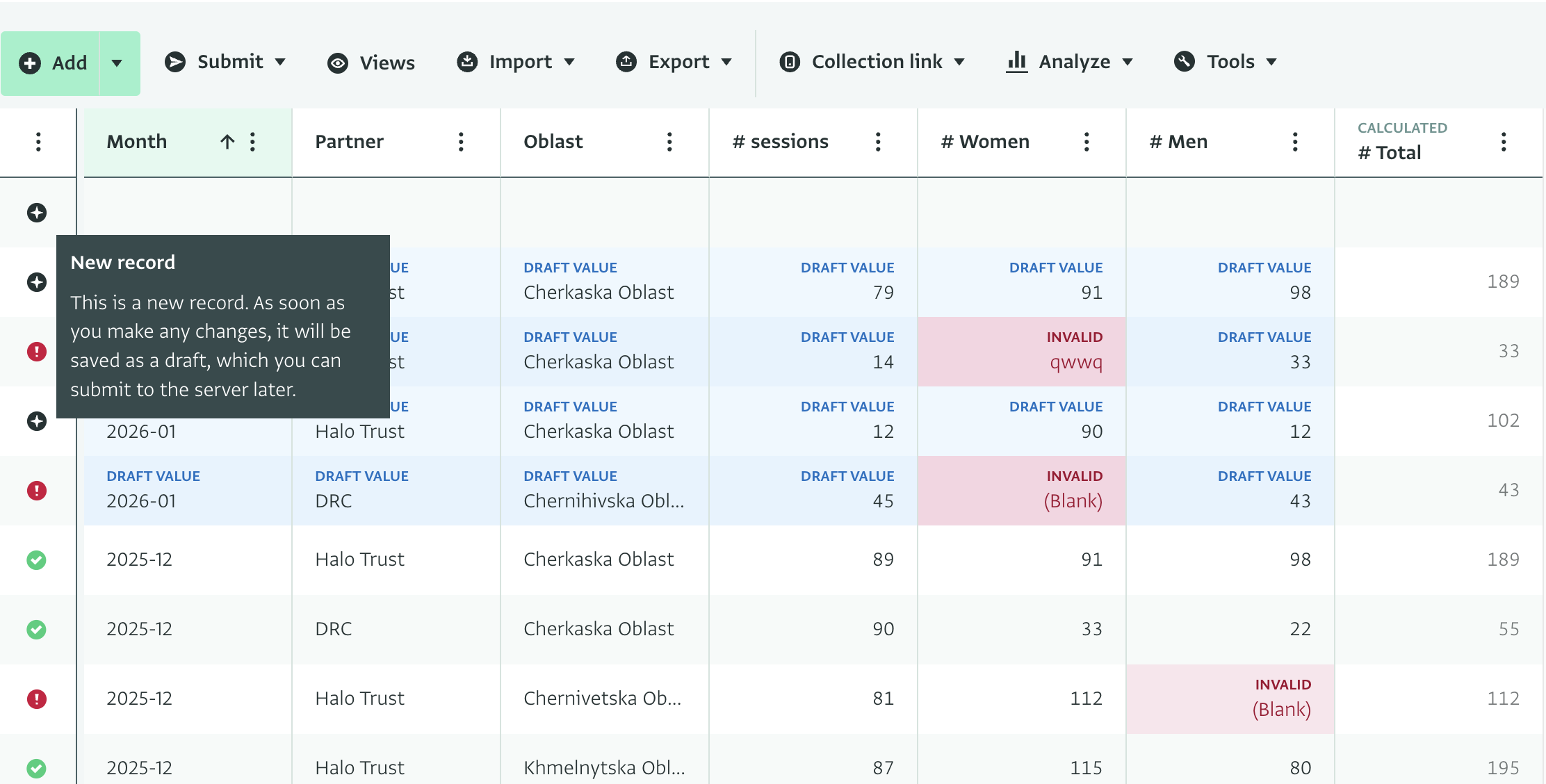
You can create distinct table views for reporting users including for example only the columns and rows they need to provide indicators for. Reporting users can then add, copy and paste, and fill down data directly in that table view.
Users get real-time feedback for the indicators they add based on the validation rules of the form. Only after these are resolved will they be able to submit their draft records to the server.
This makes the reporting process and their day to day work easier while at the same time helps maintain the high level of quality required. Then, if needed, using the record deduplication and merging features you can manage conflicts and clean duplicate data.
Day to day updates and bulk edits for project managers
Managing projects directly via the platform is much easier with the interactive table view as you can edit data directly via the table. For example, directly via the table view, you can assign distribution dates based on vulnerability scores in a CVA programme. This reduces the friction of working with project records. In the future, we wish to add more form views (such as kanban, calendar) to support this use case further.
Data cleaning or bulk editing without leaving the platform
With the interactive table view, you can avoid the process of exporting and re-importing cleaned or updated records and ensure that users work directly within the platform, keeping data in a controlled environment at all times. This reduces the risks posed by having copies of data downloaded to users’ devices on which the organization can’t have a strict overview.
By filtering and sorting records you can find outliers or missing data and delete, fill down, or copy and paste to populate fields in bulk.
Examples of data cleaning with interactive tables
Here are some examples of using interactive tables for data cleaning to draw inspiration from:
- In partner reporting, you can sort on the value of a number and delete or correct outliers.
- In case management, supervisors can filter for very old cases and close them in bulk.
- When a new field (e.g. Donor name) is added to the form, as you can create groups of records (e.g. by sector/region) and fill down the column to populate all records.
- If you forgot to make the ‘Language’ field required and there are missing values for some records but there is a correlation between the geographic area and the language, you can sort by District and fill down the preferred language, populating the column much faster.
- Another example of data cleaning and maintenance improvement is if you have forgotten to add a validation rule to the form. After adding the validation rule, all invalid records will be highlighted in the table view and you can perform bulk changes.
Do you want to learn more about the interactive table view? Take a look at our Documentation.