Grant management system for donors
This is a database template created to support the grant management data lifecycle for donors. It caters both for the pre-award and the post-award grant management phase.
After you copy this template, you can customize the database, forms and fields as well as add records to meet your needs. Click on the button below to add the database to your ActivityInfo account. If you don't have an account with ActivityInfo, you will be prompted to start a Free trial.
Create your own database based on this template
You can explore more information about using ActivityInfo as a grant management software. If you need support for a different setup you can always contact us and we can help you with a more tailored approach.
The contents of the database
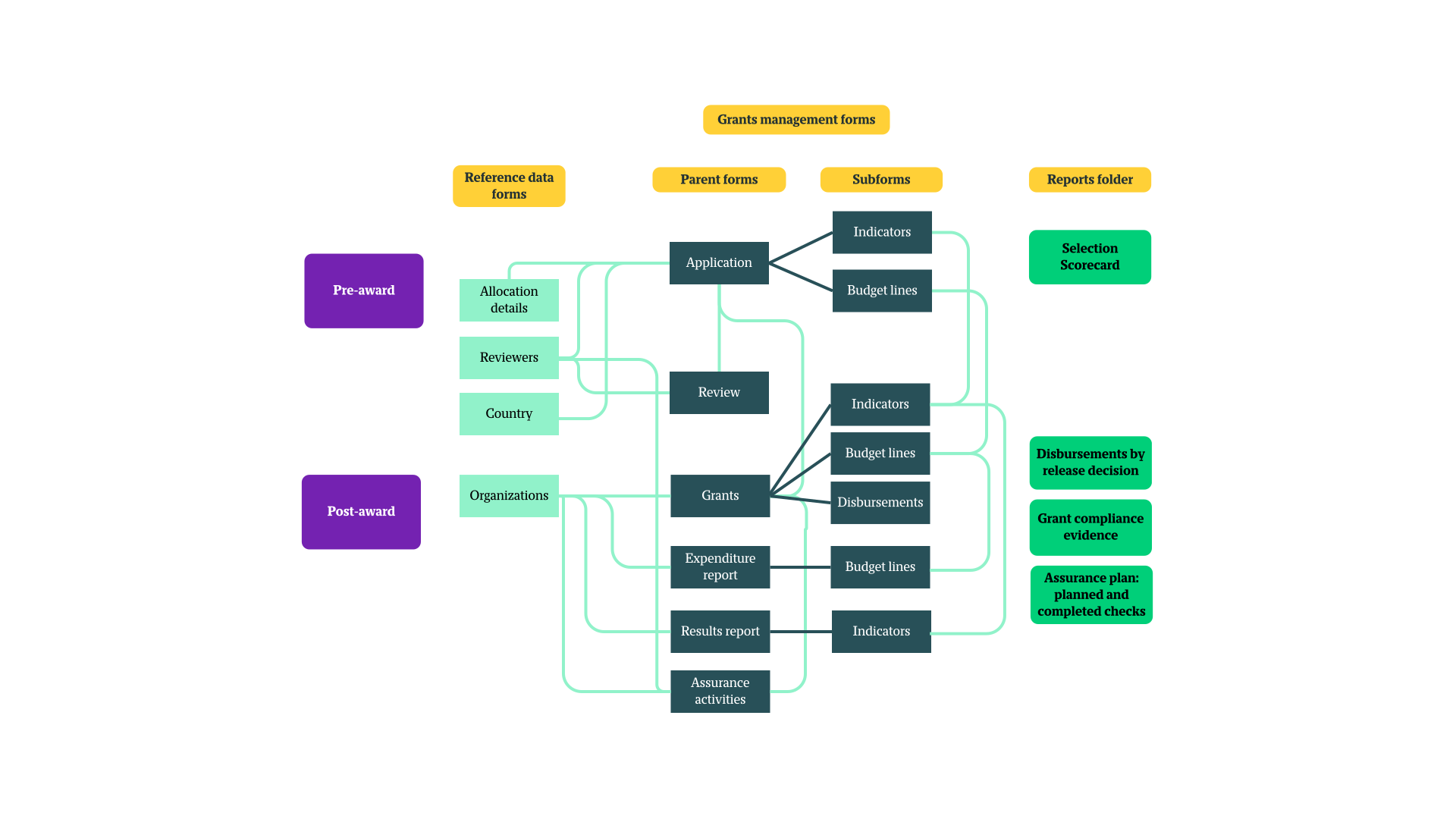
In this database you can find two folders addressing the steps included in grant management. All pre-filled data is dummy data.
The Pre-award folder includes:
- Reference data folder
- Application form
- Review form
- Reports folder
The Post-award folder includes:
- Reference data folder
- Reports folder
- Grants form
- Expenditure report form
- Results report form
- Assurance activities form
All forms and reports can be edited and adjusted to your needs. You can delete or edit fields, and add new forms and subforms. You can also add your own Records or work with the existing ones.
In the database, you will also find seven ready-made roles that can be edited or assigned directly to invited users. You can find more information about the contents of the database below.
Grant management for donors: Pre-award data management
The Pre-award folder includes various resources to help you manage data related to the pre-selection and selection phase. It aims to facilitate gathering grant applications and evaluating them.
Reference data
The Reference data folder contains forms with records that are going to be reused in other places in the database.
- Allocation details: Here you can capture information about the grant allocation including the theme priority, the amount available, opening date and application deadline, eligibility criteria and more. It includes some dummy records as an example. Other forms will link to this reference form.
- Reviewers: You can create a list of grant reviewers along with their area of expertise, contact details and other information. Other forms will link to this reference form.
Application form
The Application form contains all the fields necessary for someone to submit an application. It can be shared using a collection link with interested participants. Collection links allow people to fill in the form without logging into the ActivityInfo platform. You can place the collection link on a website, email campaign, or another type of communication channel.
Using the Application form the Applicant is assigned an application number. They can select the type of allocation they apply for (the form link to the reference form Allocation details), select their organization type, country and include information about their project proposal.
The form also includes:
- Budget lines subform: This allows applicants to add separate records for each budget line, including the type of cost and a description. A calculated field will automatically generate the sum of the requested amount.
- Indicators subform: This allows applicants to add separate records for each indicator the aim to capture, along with the Target and Due Date.
Lastly, the Application form includes a Section that can be filled in by a Program officer, this section will not be visible to people using the collection link to fill in the application. This includes notes on the application’s eligibility, but also allows you to assign reviewers to the applications.
You can also access a Record detail view for each grant application. This makes it easier to view a summary of all the information related to an application. Click on 'Views' on the table view toolbar and select 'Record view' from the Shared views in the side panel. Click on 'Display default' to go back to the Table view.
Review form
The Review form is set up to facilitate the application review process. You can select which Application you want to review from a list that is linked to the Application form, indicate who is reviewing it and when and then assign a score to it based on a variety of factors. A calculated field will automatically produce the Weighted total for each application. It is also possible to indicate the final decision and provide further comments.
Reports folder
The Reports folder includes a Notebook that gives you an overview of the scoring of the applications. You can view the lowest and highest ccore that Selected, Rejected and Under Review applications got for each Allocations theme. And you can also view a summary of Reviewers’ recommendations for each Project.
Grant management for donors: Post-award data management
The Post-award part of the database is designed to help you monitor the Grants, Expenditures, Results and many more.
Reference data
The Reference data folder contains the Organizations form with records that are going to be reused in other places in the database. This form collects the basic information about an organization that has been awarded a grant.
Grants form
The Grant form allows you to collect information about an awarded grant, its start and end date, its risk rating and it includes a Compliance section where you can indicate compliance issues. The form contains three subforms to collect additional information:
- Budget lines: This makes it possible to add separate records for each budget line.
- Indicators and targets: This makes it possible to add separate records for each indicator and target.
- Disbursements: This makes it possible to add separate records for each disbursement
Expenditure report form
The Expenditure form contains all the fields necessary for a grantee to submit their expenditures for each month. It can be shared using a collection link, this allows people to fill in the form without logging into the ActivityInfo platform. It includes one subform:
- Budget lines: This makes it possible to add separate records for each budget line.
It also includes a Finance review section, not visible when shared with a collection link, which can be filled in by a Finance officer when reviewing the submitted expenditure form.
Results report form
This form contains all the fields necessary for a grantee to submit their indicators’ progress on a monthly basis. It can be shared using a collection link, this allows people to fill in the form without logging into the ActivityInfo platform.
It includes a Program officer review section too, not visible when shared with a collection link, that can be used by reviewers of the report to provide comments on it.
Assurance activities form
The Assurances form is designed to support a monitoring party performing a check on the grantee such as a spot check, an audit, or a monitoring visit. It links to the Reviewers reference form and includes a field for adding narrative for findings. It also includes a field to capture the Audit firm so to ensure Audits are conducted independently, if that is needed.
Reports folder
Last but not least, the Reports folder includes:
- Pivot table report for disbursements: It includes the disbursements by release decision.
- Grant compliance evidence Notebook: This provides an overview of the compliance of the grants. It provides the expenditures by status, results reported by status, open assurance findings, and the compliance status by grant.
- Pivot table report for Assurance plan: This includes an overview of planned and completed checks by type for each grant.
Grant management for donors: User management
To make it easier to invite users to the platform, the database template includes some pre-made roles which you can alter. You can also add new roles. Each role has access to different resources in the database and is allowed to perform different operations. You can find the following roles in the database: Data entry, Read only, Administrator, Reviewer, Program officer, Finance officer, and Grantee.
Automations, Translations, and many more
It is possible to continue working on the database to create more forms, edit the existing ones, add or edit records, etc. You can create record detail views or reader views to explore your records more comfortably. You can also set up email notifications or other automations so that the correct colleague is notified when a date approaches or when a record is added or edited. You can also translate the interface and/or the forms in multiple languages to facilitate grantees and collaboration, and many other things.
Do you wish to discuss your grant management system with us and how ActivityInfo can support your work? You can always schedule a Demo with our team.