Automatic Deprovisioning - Keeping your User List in ActivityInfo in Sync with your Identity Provider
We are happy to announce our latest improvement in user management in ActivityInfo that aims to help you maintain a clean user list, enhance security, and reduce the time spent in managing users. If you have connected ActivityInfo to your identity provider (e.g. Microsoft Entra ID, Okta, Google Workspace, etc.), it is now possible to automatically remove users’ access from your databases when they are removed from that identity provider.
What is automatic deprovisioning?
Many organizations, especially those that work with multiple teams and people, prefer to keep one central record of who works for them and what they’re allowed to access. Identity providers (IdP) make it possible to centrally manage users.
Most organizations using ActivityInfo already take advantage of Single Sign On (SSO) through their identity provider. This ensures that users don’t have to remember an extra password, and their organization’s sign in rules -- such as two-factor authentication and conditional access -- protect their ActivityInfo accounts. When a staff member leaves the organization, they also lose access to ActivityInfo because they are no longer able to log in.
With only SSO, however, a user who has left the organization remains authorized to access ActivityInfo databases, even if they aren’t able to log in. The user continues to require a license, makes it difficult to keep an overview of who is really active in the database, and requires regular, manual review to remove inactive users.
The System for Cross-domain Identity Management (SCIM 2.0) is an open standard protocol that helps close this gap. It establishes a direct connection between an organization’s identity provider and ActivityInfo. When combined with SSO, it means that users will not only lose access to ActivityInfo when they leave their organization, but their access and license will automatically be revoked as well.
Automatic deprovisioning in ActivityInfo
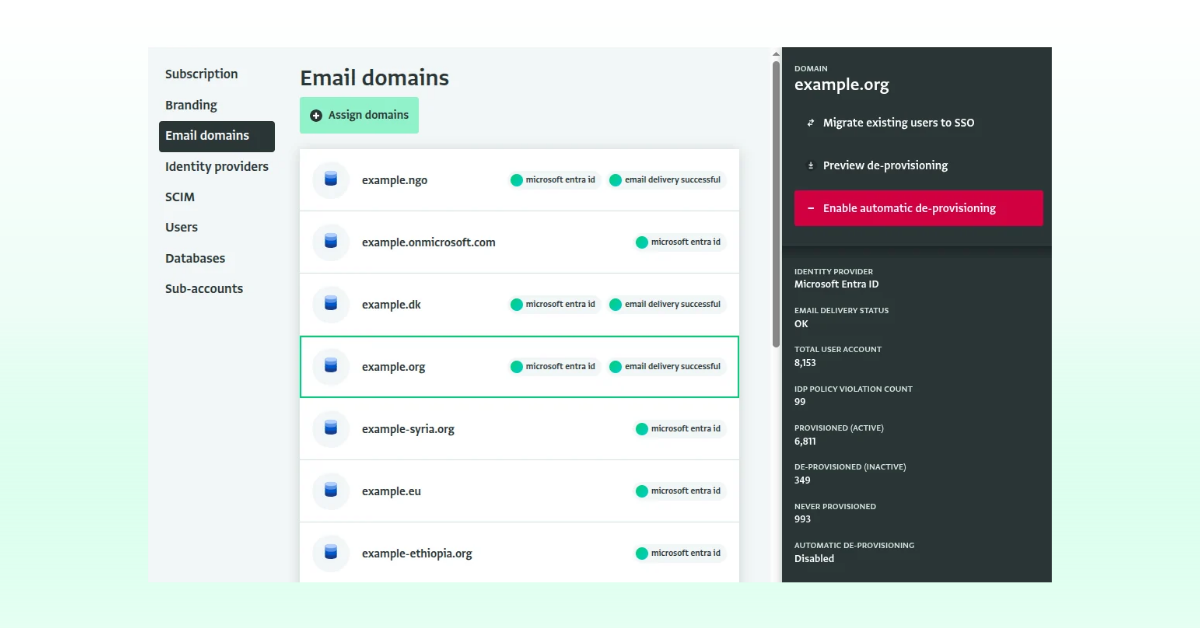
With our latest update, through your Billing account settings, you can now:
- Preview deprovisioning: Get a report for your billing account with the status of all users.
- Enable automatic deprovisioning: When enabling this, it will automatically remove deprovisioned users from your database by revoking their access to the databases 72 hours after they have been deactivated in your organization’s directory.
- Receive email update about the deprovisioned users: Account owners and users with the permission to receive Security updates (‘Security contact’ operation) of all databases where they user was invited will receive an update about the deprovisioned users. This includes databases external to your organization, where this user might have been invited as a reporting partner, for example.
Read the Documentation for more information.
The benefits of automatic deprovisioning
When deprovisioning is manual, it depends on someone remembering, and in practice accounts can get missed. This is a common and preventable risk. Automatic deprovisioning makes access follow the user’s employment status, so when someone leaves the organization, their access stops automatically.
Then, managing thousands of users across many offices, countries or partner organizations, with constant turnover, is not easily manageable. Every manual change is a task that takes time and can go wrong. So with automatic deprovisioning we aim to remove the burden from user administrators, especially in large accounts.
In addition, some organizations, especially those handling sensitive data, must show that access is reviewed and revoked promptly. Data protection rules, donor requirements and internal audits might ask about this. An automated, logged process is much easier to demonstrate than a manual checklist.
Lastly and quite importantly, because in ActivityInfo pricing is licensed per user, inactive accounts that linger mean organizations pay for seats nobody uses. Automatic cleanup keeps the user list accurate, which helps both budgeting and reporting.
This feature is currently available for all accounts at no cost for the first year.
Do you have questions about automatic deprovisioning?
Then, feel free to join the conversation in the ActivityInfo Community or raise questions to our Helpdesk via your Helpdesk Contact.