Data protection in practice - Best practices for designing Roles in ActivityInfo
- HostJeric Kison
- PanelistVictoria Manya


About this webinar
About this webinar
October is Cybersecurity Awareness Month and we acknowledge it with two sessions addressed to M&E and IM professionals who wish to increase their knowledge and confidence in regards to data security. The first session addresses the top five data security risks that professionals working with data should be aware of and the second session will dive into best practices for designing roles in the ActivityInfo platform.
During this webinar we discuss how effectively designed Roles can minimize security risks while maximizing the value that users can get out of the data. We look at specific examples and best practices that you can adjust to your team structures and program, project, country, region or team needs.
In summary, we explore:
- Principles for granting permission
- Understanding how roles work in ActivityInfo
How to design effective roles:
- Permitted operations and access to resources
- Setting up conditions to define allowed record-level operations
As well as:
- Adding parameters to roles
- Managing reference data
- User management best practices
View the presentation slides of the Webinar.
On October 19th, there will be an Office Hour session on Designing roles, where we will address more questions about specific use cases and examples.
Is this Webinar for me?
- Are you responsible for user management in ActivityInfo or is this a role you would like to take on?
- Do you wish to understand how roles and permissions work in the platform?
- Would you like to address your questions to our team?
Then, watch our Webinar!
About the trainers
About the trainers
Mr. Jeric Kison earned his Bachelor's Degree from York University in Canada and his MBA from the University of Oxford in the United Kingdom. He has worked with NGOs and governments across four continents on strategy and evaluation for nine years. Before joining ActivityInfo he worked as a Monitoring & Evaluation Officer at Pilipinas Shell Foundation, Inc., where he led a project to develop an organizational M&E System which included the roll-out of ActivityInfo as the organization’s new information management system. Today, Jeric is working as a Customer Success Director in the ActivityInfo team bringing together his experience on the ground and passion for data to help our customers achieve success with ActivityInfo.
Victoria Manya has a diverse background and extensive expertise in data-driven impact, project evaluation, and organizational learning. She holds a Master's degree in local development strategies from Erasmus University in the Netherlands and is currently pursuing a Ph.D. at the African Studies Center at Leiden University. With over ten years of experience, Victoria has collaborated with NGOs, law firms, SaaS companies, tech-enabled startups, higher institutions, and governments across three continents, specializing in research, policy, strategy, knowledge valorization, evaluation, customer education, and learning for development. Her previous roles as a knowledge valorization manager at the INCLUDE platform and as an Organizational Learning Advisor at Sthrive B.V. involved delivering high- quality M&E reports, trainings, ensuring practical knowledge management, and moderating learning platforms, respectively. Today, as a Customer Education Specialist at ActivityInfo, Victoria leverages her experience and understanding of data leverage to assist customers in successfully deploying ActivityInfo.
Transcript
Transcript
00:00:00
Introduction
Hi everyone. Good morning, good afternoon, or good evening, depending on where you are calling from. We are happy to be here today to present the second in our data security webinar series for Cybersecurity Awareness Month. Last week, we covered the top five data security risks for M&E professionals. Today, we are continuing on that theme and going over how you can apply and put some of those security principles into practice within ActivityInfo when it comes to using roles within your database.
For today, we will start with a brief introduction to data security principles to set the scene for understanding how roles work within ActivityInfo. Then, we will go into the specifics of how roles work and how to create them for your own databases. We will then go into some best practices for designing roles, looking at some examples along the way. Finally, we will leave some time at the end for Q&A.
00:05:11
Data security principles
To start off, we wanted to provide a brief overview of some of the underlying principles regarding data security that should guide the way we think about designing roles in ActivityInfo. From our perspective, when it comes to data security, there are three core things that we need to have in place to ensure that our data is truly secure. The first is confidentiality, which essentially means that confidential data—often sensitive personal information—is protected from exposure to unauthorized parties. Secondly is integrity, which means the prevention of unauthorized changes to your data, making sure that all of your data is intact and contains all the information you expect it to contain. Finally, availability. You need to balance confidentiality and integrity with availability to ensure that whoever needs that data can access it at the time they need it.
In order to have those three elements in place, it is important to follow the principle of least privilege. Security architecture should be designed so that each entity is granted the minimum system resources and authorizations that the entity needs to perform its function. Put simply, users should be given only those permissions that they need to do their job and nothing more. In a recent analysis we did among our user base, we learned that between 40% and 75% of users with administrative permissions were not actually using them. This poses a significant risk because it opens up the possibility of unauthorized access or changes to data. Following this principle of least privilege minimizes the risks of confidentiality breaches and threats to integrity while keeping data available to those who need it.
00:09:03
Understanding roles in ActivityInfo
Roles play a pivotal role in shaping the way that users interact with and access data within a database. They are essentially a set of predefined rules or guidelines that help you regulate what actions users can perform and what parts of the database they can access. By creating roles, you can manage and control data access and user activities in your database. These roles act as a blueprint for defining the boundaries and privileges that each user or group of users should have.
For instance, you can have roles like Admin, Supervisor, or Manager. Each would have its distinct permissions and limitations. An Admin might have full access to all data and the ability to make changes. A Manager role might have access to specific sections and can edit certain records. A User role might only have read-only access. Roles serve as a critical tool in managing your ActivityInfo database and offer you a way to maintain data integrity, enforce security, and create a structured environment.
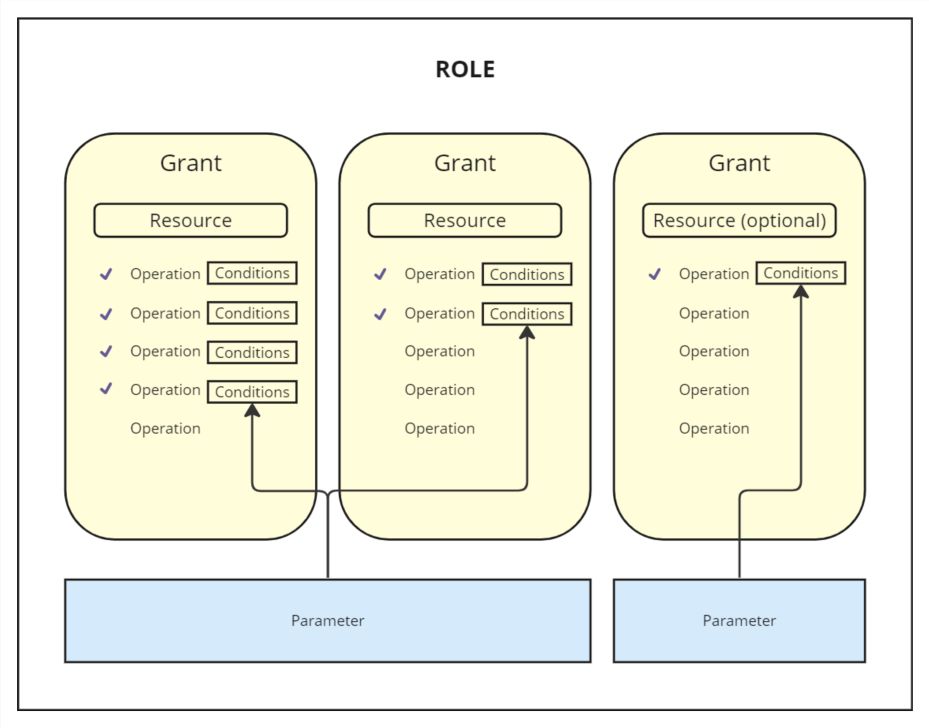
Roles are a combination of two broad concepts: grants and parameters. Before we explain these, there are three things you need to know. First, roles can have multiple grants attached to them, and these grants allow access to various resources within your database. Second, grants specify the permitted operations for the selected resource. Third, roles can also have multiple parameters which can be applied with conditions across grants as required.
00:14:25
Resources and operations
Let's break down the concepts that constitute the design of roles: resources, operations, grants, optional grants, conditions, parameters, and roles themselves.
Resources are basically your folders, reports, databases, and forms. Wherever you hear "resources" in the context of permissions, we are talking about these items. "Resource" is just the name that helps us put them in one big bucket.
Operations refer to actions carried out on both resources and users within ActivityInfo. This encompasses a wide range of actions that can be performed, including but not limited to view, add, edit, and delete records. It extends to activities such as managing users, creating or modifying forms, and handling locks. Operations are essentially action words. For example, if I have colored cards and I say you can pick a card or change the color of a card, these are the actions or operations I am giving you permission to perform.
00:17:25
Grants
Grants are a fundamental concept because they play a very important role in defining which specific resource a user is permitted to take action on. Grants dictate what resource you can take the action on, making them very useful for access control. Using the card analogy: if the operation is to "take" the card, and the resource is the card itself, the grant is where I specify that you can take the "blue" cards. It identifies the exact resource you should take action on.
In ActivityInfo, it is not enough to say you have permission to edit. We must say you have permission to edit forms or folders, and specifically, you have permission to edit Form A or Form B. One noteworthy aspect of grants is their inheritance mechanism. If you apply a grant to a higher-level resource like the database, it automatically extends the setting to all the resources contained within that database. It is like a family inheritance; if the father is wealthy, the children inherit that status. If a grant is applied to an entire database, it sets the same permission for all resources within that database.
However, if you decide to apply a grant to a folder instead of the entire database, it automatically extends its settings only to the resources contained within that folder. Anything outside of that folder will not have the grant. Finally, if you apply grants to one form, then the permission is limited to that form alone.
Flexibility is also built into the new grant-based roles. If there is a need to override or customize permissions for a specific resource, you can do so by applying a new grant directly to that particular resource. This means that while inherited grants provide a default set of permissions, you can fine-tune access control by applying individual grants at a more granular level.
00:29:19
Optional grants and conditions
We also have optional grants. The term "optional" implies that when setting up a grant, you have the discretion to determine whether it is a requirement or merely a choice for any user. You can choose to enable or disable this grant on a per-user basis when assigning the role.
Conditions are crucial as they allow you to establish rules governing which records a user can perform actions on. These rules are always expressed as a formula that yields a result of either TRUE or FALSE. You can utilize the Rule Builder, which simplifies the creation of common types of formulas. Formulas can serve various purposes, including determining record and parameter relations, or field value matching. For example, you can create a condition that checks if a specific field matches a specific value. This is beneficial for controlling access based on data attributes.
You are not limited to predefined formulas; we have also made provisions for the Formula Editor, which allows you to write your own custom formulas. For instance, if you want to restrict access to records of individuals under a certain age, you can create a condition with a rule that allows view operations only for records where age is greater than 18.
00:33:26
Parameters
Parameters are closely tied to reference forms. They are attributes assigned to a user which can be used in conditions to control the record-level operations they are allowed to perform. For instance, if your reference forms are Region or Sector, the reference form defines the range of possible values that can be assigned to a user. If a user has been assigned the parameter value "West" from the Regions reference form, you can configure a condition that allows the user to perform specific actions, like adding records, but only for the Western region.
00:34:44
Demonstration: Creating a role
To create a role, you go to your database settings. You can add a new role, for example, "Cluster Coordinator." Once the role is added, you add resources to the role. You select the specific form or folder you want the role to access. This creates a grant. You can then select the permitted operations (view, add, edit, delete, etc.). You can also decide to set it as optional or choose whether to display it in the list of forms.
After saving the role, you can invite a user. You type the user's email and select the role you want them to have. The user then receives an invite and can access the database with the specific permissions defined by that role.
00:39:12
Example scenario: Case management
Let's look at a real-world scenario where you can apply these features. Imagine you are running a case management program with a database containing records representing individual cases. These cases contain highly sensitive personal information, such as victims of GBV. It is critical to ensure that this sensitive information is only available to those who need it.
In this scenario, each case is assigned to a single caseworker, and there is a layer of oversight where each caseworker has a supervisor. For caseworkers, we need to ensure they can only access the records of the cases they are assigned to. For supervisors, they should be able to access their own cases and the records belonging to the caseworkers they manage. Additionally, caseworkers should be able to view reference records to categorize cases but should not be able to edit them.
To configure this in ActivityInfo:
00:52:09
Best practices for designing roles
Here are some best practices to keep in mind when designing roles:
Design roles with narrow user permissions: Follow the principle of least privilege. Consider whether users really need the ability to edit or delete to prevent unauthorized changes. Be careful with exporting and publishing permissions to protect confidentiality. Grant user management operations very selectively, entrusting them only to those who understand data governance policies.
Design roles with the broad context in mind: Understand the roles and responsibilities within your organization and how data flows. Educate end users on data security so they perform actions in accordance with your policies. Regularly review and update roles whenever the context changes, such as removing permissions when a data collection period ends.
How many roles do I need? Generally, you will likely need to create fewer roles than you think. Use optional grants to enable access to different resources while maintaining a common set of universal permissions. Use parameters to differentiate which records a user can work with, rather than creating separate roles for every region or sector.
00:56:10
Q&A
Question: If I have a reference form where different regions are listed, and I need a user to have access to two regions within the same reference, can I create two parameters with the same parameter ID?
Answer: This is a common scenario. If you are dealing with the possibility that multiple values can be assigned to an individual user coming from the same general category (like Region), you can approach that by creating two separate parameters for that role (e.g., Region 1 and Region 2). Both can be set to link to the same reference form. When you add a user to the database and select that role, you will see two dropdown lists, allowing you to select a region for the first list and another region for the second list.
Sign up for our newsletter
Sign up for our newsletter and get notified about new resources on M&E and other interesting articles and ActivityInfo news.